
I Rule My Game!
 The
Republic of Gamers consists only the best of the best. We offer the
best hardware engineering, the fastest performance, the most innovating
ideas, and we welcome the best gamers to join in.
The
Republic of Gamers consists only the best of the best. We offer the
best hardware engineering, the fastest performance, the most innovating
ideas, and we welcome the best gamers to join in.In the Republic of Gamers, mercy rules are only for the weak, and bragging rights means everything. We believe in making statements and we excel in competitions. If your character matches our trait, then join the elite club, make your presence felt, in the Republic of Gamers.
Specifications
| Graphics Engine | NVIDIA GeForce GTX 580 |
| Bus Standard | PCI Express 2.0 |
| Video Memory | GDDR5 1536MB |
| Engine Clock | 816 MHz |
| CUDA Core | 512 |
| Memory Clock | 4008 MHz ( 1002 MHz GDDR5 ) |
| RAMDAC | 400 MHz |
| Memory Interface | 384-bit |
| Resolution | D-Sub Max Resolution : 2048x1536 DVI Max Resolution : 2560x1600 |
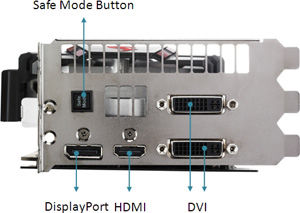
| Interface | D-Sub Output : Yes x 1 (via DVI to D-Sub adaptor x 1) DVI Output : Yes x 2 (DVI-I) HDMI Output : Yes x 1 Display Port : Yes x 1 (Regular DP) HDCP Support : Yes |
| Accessories | 2 x Power cable 1 x Extended SLI cable 1 x DVI to D-Sub adaptor |
| Software | ASUS Utility and Driver |
| ASUS Features | DirectCU Series Matrix Series Super Alloy Power |
| Dimensions | 11.5 " x 5 " Inch |
| Note | To have the best cooling performance ASUS MATRIX GTX580 P/2DIS/1536MD5 extends the Fansink to 2.6 slot , please check your motherboard slot space before SLI |
ASUS Exclusive Innovation
 |
TweakIt – Instant voltage adjustment!TweakIt provides users with flexible overclocking control even when running benchmark programs! The “+” and “-” button puts overvolting adjustments in the user´s fingertips, offering them performance optimization options during game play to gain the competitive edge. |
 |
ProbeIt – Instant voltage measurement!ProbeIt takes the guesswork out of locating the graphics card´s measurement points, identifying them clearly in the form of 6 sets of detection points so you´ll know exactly where to get quick yet accurate readings using a multimeter. |
 |
Safe Mode – Instant settings reset!Safe Mode button resets the graphics card back to default frequencies & BIOS. This is a very welcomed feature for hardware enthusiasts, think of it like the "Clear CMOS" on a motherboard. |
 |
GPU Tweak – Professional graphics overclocking tools for enthusiasts!The latest ASUS overclocking utility offers
 
|
 |
19-phase Super Alloy Power – Efficient power delivery!Built with exclusive 19-phase Super Alloy Power technology, the MATRIX GTX 580 guarantees much greater overclocking headroom, with a 15% performance boost, 2.5 times longer lifespan and 35°C cooler operation than the reference card design.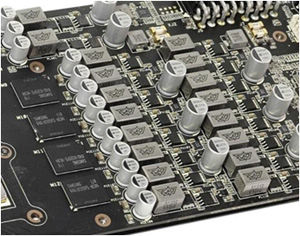 |
||
 |
DirectCU II – 600% greater air flow, 20% cooler operation than reference!Cooling is well taken care of by exclusive DirectCU II technology that puts copper heat pipes in direct contact with the GPU. The pipes efficiently transfer heat through two massive fans that deliver 600% more airflow than the reference design, resulting in a 20% lower operating temperatures. |
 |
MATRIX LED load Indicator - GPU loading at-a-glanceA multicolored LED MATRIX indicator at the rear of the ROG MATRIX GTX 580 gives an instant and easy-to-understand visual display of the current GPU load. |
Graphics GPU Features
 |
Powered by NVIDIA® GeForce® GTX580 |
 |
GeForce CUDA™Unlocks the power of GPU’s processor cores to accelerate the most demanding system tasks |
 |
NVIDIA® SLI™Supports multi-GPU technology for extreme performance ode |
 |
NVIDIA PhysX™Delivers dynamic visual effects like blazing explosions, reactive debris, realistic water, and lifelike characters. |
 |
NVIDIA® 3D Vision™Immersive yourself in 3D gaming world |
 |
DirectX® 11 Done RightBrings new levels of visual realism to gaming on the PC and get top-notch performance |
 |
Microsoft® Windows® 7 CompatibleEnable PC users to enjoy an advanced computing experience and to do more with their PC |
I/O Ports Highlight

0 Comments:
Post a Comment